
Procedurally Modeling Flowers in Blender
16 January 2026
It seems like we are bestowed with an infinite variety of flowers. However, notice that you can describe most flowers by specifying a finite number of floral characteristics, such as, the shape of the petal, its color, number of petals, the shape and the number of stamen, color of anthers, thickness of the style, and so on. I took up this side-project to see if I could distill a large class of flowers down into a small number of characteristics or parameters, and use these to synthesize and render 3D models of flowers in Blender, an open-source 3D computer graphics software. (I also used this opportunity to learn Geomety Nodes in Blender, a “system for modifying the geometry of an object with node-based operations”.)
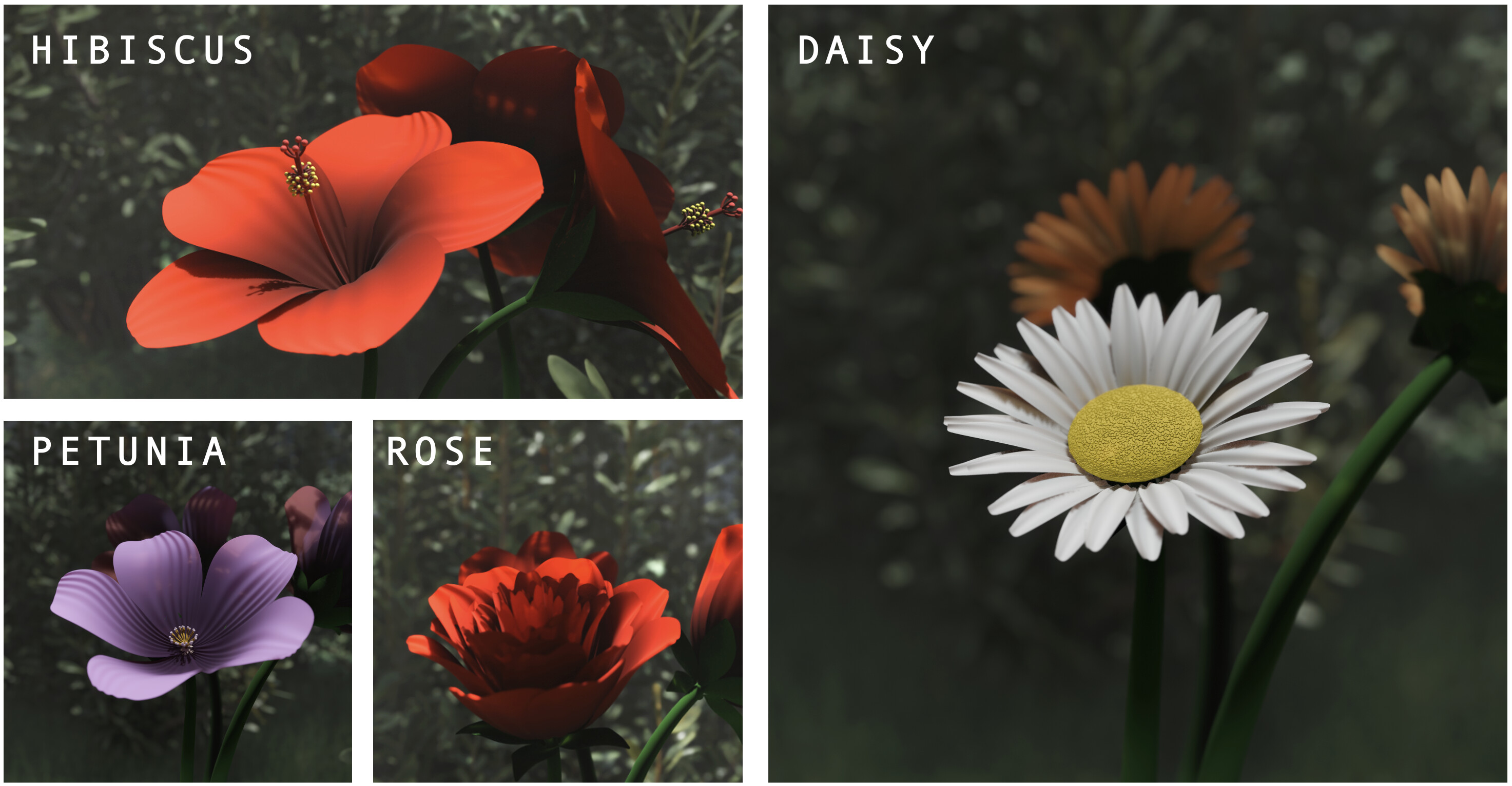
Before we start, below are some of the flowers that were created using the method described in this post.
While I did this weekend(s) project out of curiosity and as a monotony breaking exercise, modeling flowers this way has a very practical application: once you have the model, you can go from one flower to another without having to redraw or remodel it from scratch. All you have to do is change a few numbers (i.e., parameters) and you have a new flower. For example, the video below shows how you can go from a daisy to a hibiscus by changing the values of a few parameters like the shape of the petal, number of petals, length of the style, color etc. You can imagine how convenient this would be in a movie CGI studio, for example, that needs to make hundreds of different flowers for a garden scene.
I have only shown a small subset of parameters in the above video. In reality, there are over eighty five parameters (see glossary) that I consider to model many of the subtelities in flowers. For example, the shape of the petal droop, its tilt, the thinkness of the anthers and filaments, characteristics of the sepals like their numbers and shape, and so on. Even the colors and textures require careful engineering. For example, notice that the hibiscus petals above are not pure red. But rather, they are a darker red near the center and get lighter towards the edges. There are also “waves” across the breadth of the petal. Even such subtle effects are accounted for using parameters. The waves, for example, are modelled using parameters like “petal wave density” and “petal wave depth”. Perhaps now you can see why I had to account for a large number of parameters.
A warning before we proceed – none of this is biologically accurate. Conisder the daisy. As I learnt during the course of this work, a daisy is not a single flower but a “composite”. The central yellow disc is made up of hundreds of little flowers called “disc florets”. The white petal-like projections are not your traditional petals, but “ray florets”. Each of these florets is a complete flower by itself. However, the way I have modeled a daisy is by scaling up the stigma and using a texture to make to it look like it has tiny projections on it. Needless to say, this is nothing like the actual daisy. Given that I am not submitting this to a biology class or the Department of Horticulture, I have taken some liberties and will give myself a pass; you should too.
The shape of the petals might be the most distingushing feature of a flower. It is also the least intuitive to think of in terms of just numbers. Perhaps, when you describe the shape of a hibiscus petal, you might compare it to the outline of an upside down pot; or you could say, “it starts narrow, gradually broadens and then hastily tapers off at the top.” Normally, you would not use numbers to describe the shape. Given that we have now constrained ourselves to reduce flowers down to a few numbers, how do we deal with this famously qualitative characteristic? That is just what we will look at next.
Petal Shape
To cut to the chase, for the impatient, I model petal shapes as cubic functions. You might have been introduced to them in your high-school mathematics class. However, I suspect they looked nothing like flower petals in your math textbooks. But turns out they could, if used correctly. I will first provide a refresher on cubic functions and then describe how I used them to model petal shapes. Some readers might be overly familiar with cubic functions, in which case, you could skip the refresher. But I would still like to tempt you to try out the interactive widget.
Refresher on cubic functions
The simplest cubic function is \(y = x^3\). That is, for different values of \(x\) (i.e., the horizontal axis), the value of \(y\) (i.e., the vertical axis) is its cube. For example, at \(x = 0.5\), the value of \(y = 0.5*0.5*0.5 = 0.125\). If you graph the values of \(y\) for all different values of \(x\), you get the curve of the function. The interactive widget below, by default, shows the curve of the function \(y = x^3\). A generic cubic function is of the form:
\[y = ax^3 + bx^2 + cx + d,\]where \(a,b,c,d\) are constants. Let’s set the values of the constants in the widget as follows (you can type in these values if the slider is inconvenient):
\[a = -5.4, b = 4.9, c = 0.8, d = 0.2\]For this specific cubic function, at \(x = 0.5\), the value of \(y = -5.4*(0.5)^3 + 4.6*(0.5)^2 + 0.8*(0.5) + 0.2 = 1.075\).
The shape of the curve changes based on the values of \(a, b, c, \text{and } d\). You can try changing the values of the constants in the widget below and notice how the shape of the curve changes.
Shift + Scroll: Zoom X • Alt + Scroll: Zoom Y
Back to petal shape
If you haven’t already, set the values of the constants \(a,b,c, \text{and } d\) in the cubic function widget to the values shown above in the refresher. Notice the shape of the curve within the region \(0 \leq x \leq 1\).
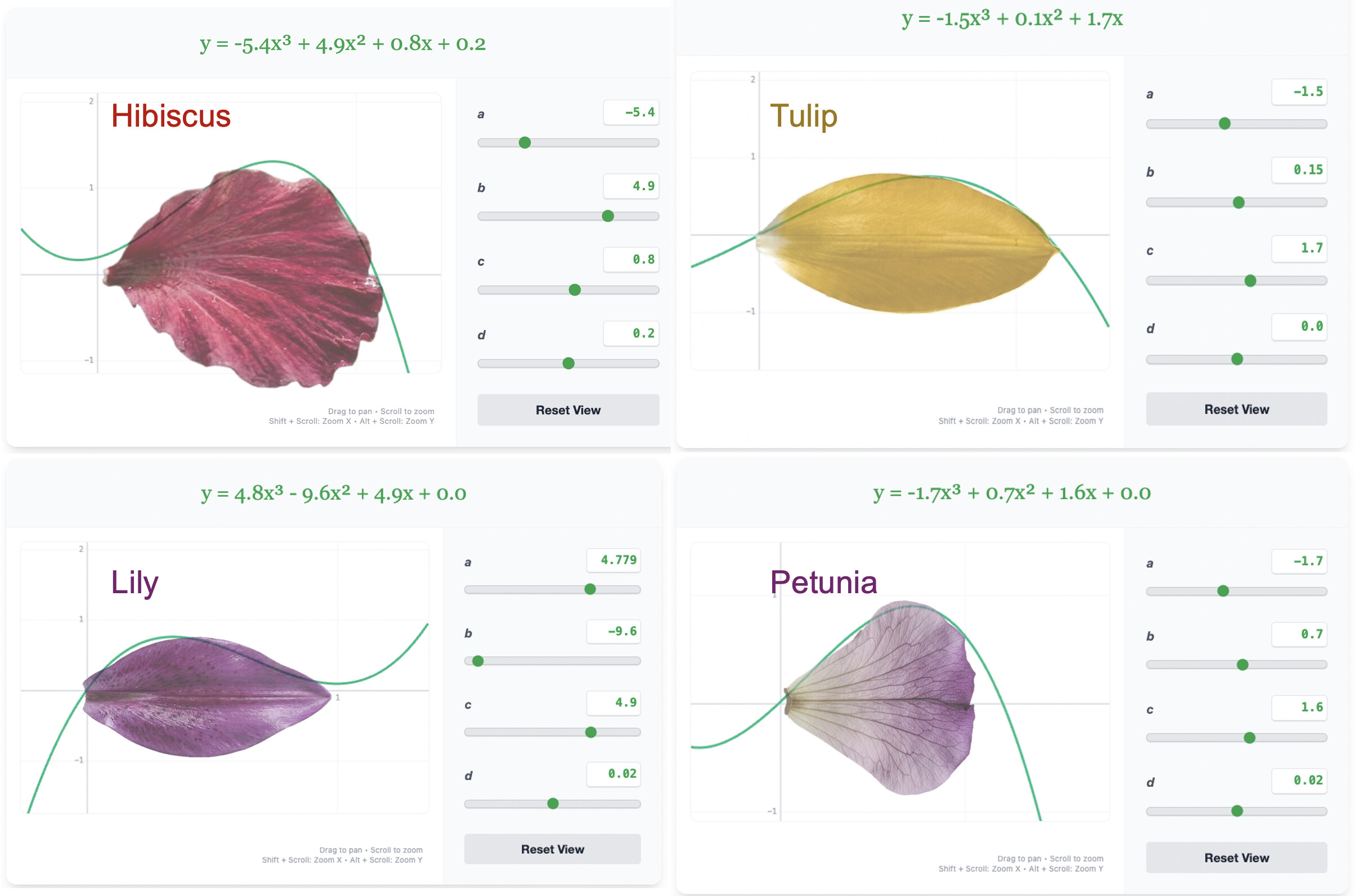
Notice how the curve somewhat resembles the shape of one side of a hibiscus petal (but ONLY inside the region \(0 \leq x \leq 1\)). Below I show singular petals of some flowers overlaid against their corresponding cubic functions. Notice the values of the constants for each of these petals, and try them out in the above widget if you are dedicated enough.
We now have an insight: cubic functions can approximate one side of a petal shape. Using this idea to build 3D geometry of petals is non-trivial. To achieve this, we turn to Blender and its magical feature: Geometry nodes. The documentation for Geometry Nodes says “Geometry Nodes is a system for modifying the geometry of an object with node-based operations”. Do not let the term “node-based operations” scare you. It just means representing an ‘operation’ that you want to do using units called ‘nodes’. Let’s look at an example to make things clearer. Let’s go back to our cubic functions and inspect how the operation of cubic functions can be represnted using nodes.
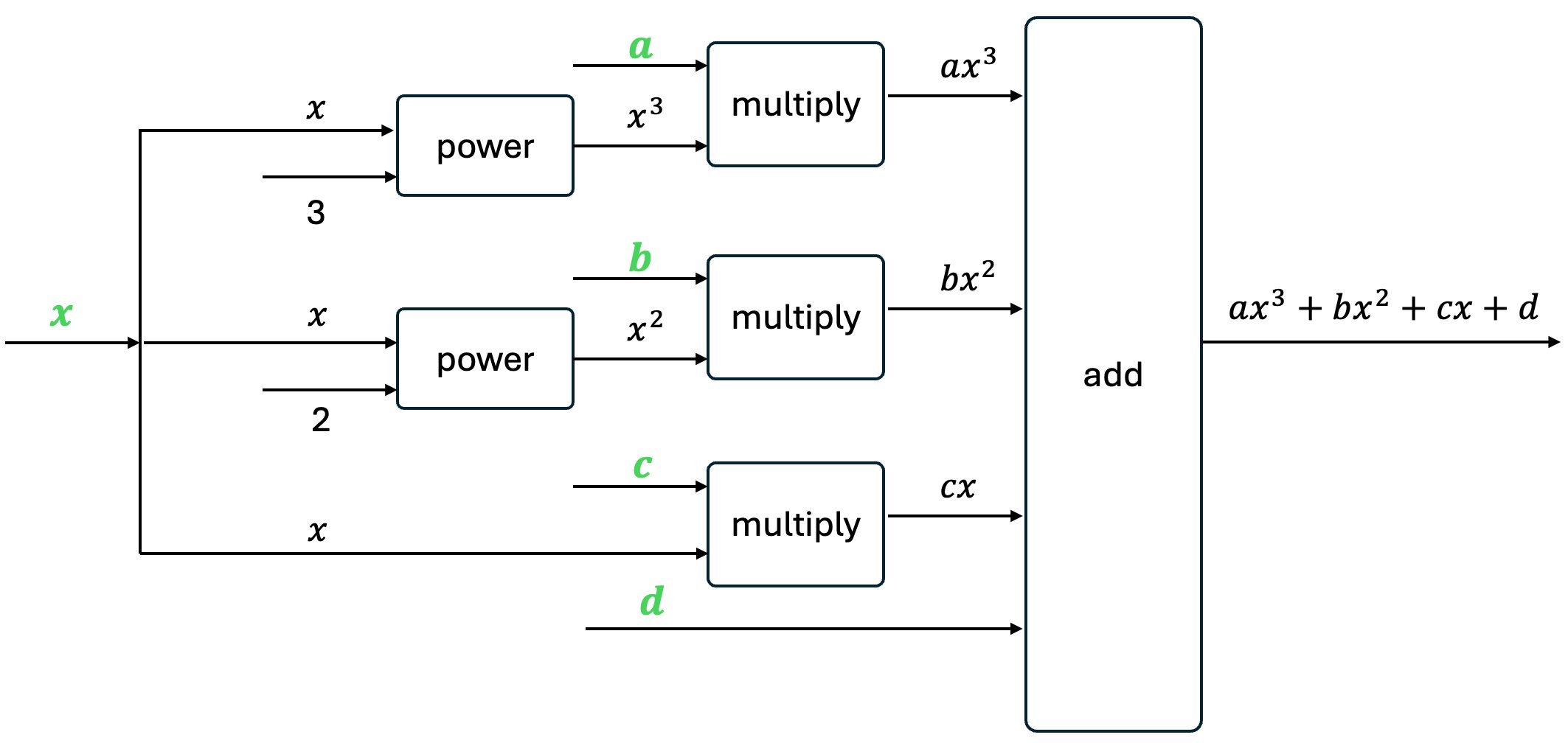
A cubic function of the form \(ax^3 + bx^2 + cx + d\) is composed of three simpler operations: add, multiply, and power. \(a\) is multiplied with the third power of \(x\), then added to \(b\) multiplied by the second power of \(x\) and so on. This can be represented using nodes as shown in the following image:
Blender’s geometry nodes provides some nodes that generate geometry. For example, the Curve to Mesh Node generates a 3D Mesh (i.e., a set of 3D points, edges, and faces) given a curve. I will not go into the details of Blender’s geometry nodes here. There could perhaps be books written about it, if you care to search. But the gist of it all is that I use Blender geometry nodes to model cubic functions and then to turn them into 3D geometry.
Petal Droop
Notice that different petals have different shapes of droop. For example, daisy petals shoot up from their central disk and stay upright, whereas Hibiscus petals seem to droop down toward the edges when they are in full bloom. I modelled the droop also as cubic functions. The cubic function, in this case, is used to influence the droop of the 3D petal resulting from the operations described previously.
See the Glossary section below for a desription of other parameters.
If you are still confused by all this, remember that life is larger than reading and understanding random blogposts. To reward you for reading this post, here is the Blender file with the entire geometry nodes setup. It has parameters for many flowers and the transitions between them. Feel free to use it, at no cost, for whatever purpose you wish. If you do end up downloading and using it, shoot me an email to let me know and I’ll be happy! Stop to smell some flowers next time you see them!
Glossary
Geometry parameters
The following parameters describe the geometry (i.e., 3D shape) of the flower. In total, there are 50 geometry parameters. Here, I am ONLY considering parameters that are NOT the same across all flowers, but are different for at least two flowers. For example, the length and shape of the stalk are represented using parameters. However, in this project, all flowers have the same stalk, and therefore, I am not considering them as spearate parameters in the table below.
| Flower component | Number of parameters | Examples |
|---|---|---|
| Petal | 12 | Shape of the petal, its droop, tilt, length, and depth. |
| Whorl | 8 | # of whorls, # of petals / whorl, inter-whorl distance, radius |
| Pistil | 13 | Length and shape of the style, size of the stigma, size of the ovary, number of style branches |
| Stamen | 10 | Length and shape of the filament, size of the anther, # wholrs of stamen, # of stamen / whorl |
| Sepals | 4 | # of sepals, shape, their position w.r.t the flower |
| Misc | 3 | Size of the flower, size of the stalk, position of the flower w.r.t the stalk |
| Total | 50 | – |
Color and texture (material) parameters
The following parameters describe the color and texture, or the material, applied to different parts flowers. In total, there are 36 material parameters. Even in this case, I am only considering parameters that change across at least two flowers. For example, I am not considering the color of sepals as a parameter below because I maintain the same shade of green for all sepals in this project.
| Flower component | Number of parameters | Examples |
|---|---|---|
| Petal | 19 | Color near the core and edges, weightage between “wavy” texture and “linear” texture, Color of the crests and troughs of the wave texture, roughness of the petal |
| Stigma | 5 | Color of the stigma, weightage between “noisy” displacement and “voronoi” displacement |
| Anther | 3 | Color |
| Filament | 3 | Color |
| Ovary | 3 | Color |
| Style | 3 | Color |
| Total | 36 | – |